Best Username Search Apps for Your Phone: What to Look For
By WhatsMyName Apps team · · 5 min read
Search an app store for "username search" and you get a long list. Some check a handle across thousands of sites. Some only look inside one social network. A few promise things no tool can honestly deliver. The store pages look alike, so picking one before you install is mostly guesswork.
Full disclosure: we make one of these, the free username search app for Android. So we won't rank other people's apps: we can't check their claims ourselves. This post gives you the checklist we'd use on any of them, ours included, and covers the times you don't need an app at all.
Three kinds of username tools you can use on a phone
Dedicated username search apps
These are installed apps that take one handle and check it across many sites, then list where an account exists. They suit people who search often or away from a computer. Coverage, accuracy and pricing differ a lot from one app to the next.
Web tools in your mobile browser
A web username search runs in Safari, Chrome or any other browser with nothing to install. Our own username search works this way and covers 3,165 sites. For a one-off check, or on a phone that has no app for this, the browser is often the simplest route. Our roundup of the best username search engines compares the web options.
Command-line OSINT tools
Open-source tools such as Sherlock and Maigret are built for computers. Getting them to run on a phone usually means a terminal app and some setup work. Researchers like them because they are free and you can read the code. For most people, though, they are more effort than a phone check is worth. If that side interests you, see our guide to the best OSINT username tools.
The search box inside each social app is the fourth option, but it only checks that one network. You would need to repeat it in every app.
What to look for in a username search app
How many sites it checks, and whether the list is kept up
A big number on the store page means little if half the sites changed their pages years ago. Check whether the app names its site list or says where the list comes from. Lists built on maintained open-source projects tend to stay accurate for longer than a fixed set hard-coded into the app.
Where the scan runs
Some apps send your search to their own server, which runs the checks and passes back the answers. Others make every request straight from your phone. Both work. On-device scans do mean the usernames you type never pass through the app maker's server. The store listing or privacy policy should tell you which kind you have. If it doesn't say, assume a server is involved.
Honest statuses, not only "found"
Sites block automated checks now and then, and sometimes they send back pages a tool can't read. A good app shows those cases as separate statuses instead of quietly counting them as "not found". If an app only ever shows hits, you can't tell a free name from a check that failed.
Something to verify a result with
A matching username on two sites does not mean one person owns both. It helps when the app shows public profile details, such as the display name, avatar or bio, so you can tell the right account from a stranger with the same handle.
A clear price
Free apps pay for themselves somehow, usually with ads, limits, a subscription or a mix. Any of those can be fine as long as the store page and the app say so before you rely on it. Read the store listing for in-app purchases before you install.
Permissions that fit the job
A username search needs internet access. It has no obvious need for your contacts, location, microphone or call logs. If an app asks for those, ask yourself why, or pick a different one.
A way to keep your results
For a brand launch or an account clean-up you'll want a record, and a CSV or JSON export beats a pile of screenshots.
Red flags worth skipping
- Promises to unmask anyone. No username tool can reliably tell you who runs an anonymous account, and apps that claim to are guessing or selling something else.
- "See private profiles" or "see who viewed you". Sites don't share this with outside apps. Treat these features as bait.
- Phone numbers and home addresses from a username. That is people-search territory, with its own legal rules, and it is not what a username check does.
- A login wall before the first search. Checking public profile addresses doesn't need an account. Asking for one up front mostly helps the app maker.
How our Android app measures up
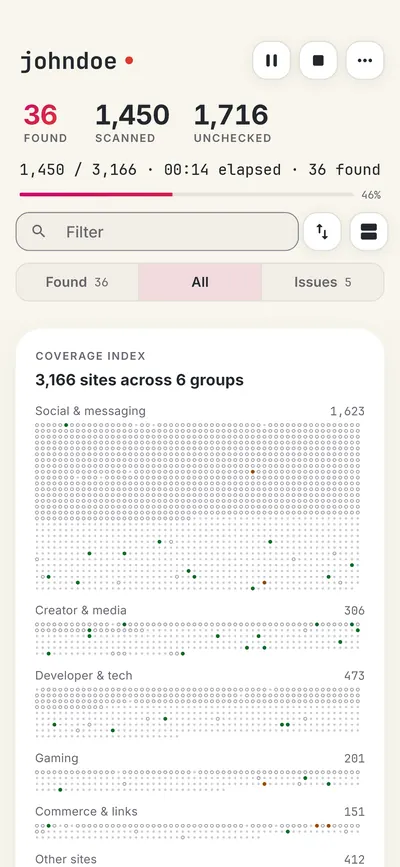
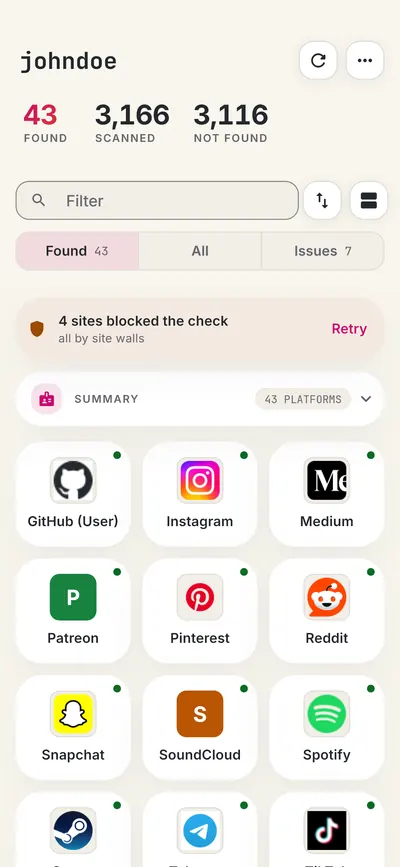
Measured against that same checklist, WhatsMyName: Username Search looks like this:
| Check | Our app |
|---|---|
| Sites | More than 3,150, from the same open-source site lists as our website |
| Where scans run | On your phone; there is no scan server |
| Statuses | Found, Not found, Blocked and Unknown, with a retry for blocked sites only |
| Verifying results | Public profile details where the site allows: display name, avatar, bio and links |
| Price | Free with ads; a set of free searches each day, and more can be unlocked in the app |
| Account | None needed |
| Keeping results | Recent searches stay on the phone; export as JSON or CSV |
| Languages | 10 |
What it doesn't do: it has no iPhone version yet, and like every tool of this kind, it can't prove who owns an account. The app's privacy policy lists what the app and its ads collect.

When a web tool is the better choice
Skip the install if you are on an iPhone, if you only need one quick check, or if you would rather avoid ads. A browser-based search does the same job without storing anything on the phone. If you want step-by-step help with either route, our guide on how to search a username on your phone walks through both.
An app makes more sense when you search often, want your recent searches saved on the device, or prefer that the names you check never pass through anyone's server.
FAQ
Are username search apps accurate?
They are as accurate as their site lists. Sites change their pages, block checks and reserve names, so treat every result as a lead and open the profile before you rely on it.
Is it safe to use a username search app?
Generally, yes, if it asks only for the permissions it needs and explains its data use in a privacy policy. Checking public profile addresses doesn't notify the person you look up.
Can a username app find someone's real name?
Only if they put it on a public profile themselves. A username search finds accounts with a matching handle, not the identity behind them.
Is there a good free option?
Several apps and web tools are free, usually with ads or daily limits. Our Android app and our web search are both free with ads, and neither needs a sign-up.
The app and this site are not affiliated with the WhatsMyName project or with Google. Google Play is a trademark of Google LLC.
Check a username now. Free, no sign-up, 3,165 sites. Try the username search

Search usernames on your phone. Get the free Android app. Scans run on your device.
Related in OSINT
- OSINT
What Mr. Robot Gets Right About OSINT and Your Digital Footprint
Mr. Robot and OSINT: how Elliot profiles people from public accounts and reused usernames, what is realistic, and how to shrink your own digital footprint.
· 6 min read
- OSINT
Sherlock vs Maigret vs WhatsMyName: Which Username OSINT Tool to Use
Sherlock, Maigret and WhatsMyName compared from their own documentation: site coverage, output, profile parsing, setup, and which one fits your username investigation.
· 6 min read
- OSINT
What Is OSINT? A Plain-English Guide
What OSINT means, where the term comes from, who uses it, common sources and tools, the legal and ethical limits, and how to start with your own footprint.
· 6 min read


More from the blog
- How to Search a Username on Your Phone (3,150+ Sites on Android)
- Reserve Your Username Before You Launch: A Phone Checklist
- Find Forgotten Accounts Using Only Your Phone
- We Checked 60 Usernames Across 3,166 Sites: Here's What We Found
- How to Get a Custom Bluesky Handle With Your Own Domain
- Bluesky Handle Availability: How to Check and Claim Yours